Gode rutiner: Opprette konfigurerbare tilleggsprogrammer
Med ArcGIS Extensibility SDK for Silverlight får du mulighet til å gjøre verktøyene og virkemåtene konfigurerbare. Hvis et verktøy eller en virkemåte er konfigurerbar, kan du konfigurere komponenten i Map-webdelen. Hvis du vil eksponere konfigurasjon for et verktøy eller en virkemåte, må du implementere grensesnittet ESRI.ArcGIS.Client.Extensibility.ISupportsConfiguration. Dette grensesnittet krever at du implementerer følgende metoder:
- Configure – aktiveres når en designer klikker på konfigurasjonsknappen for verktøyet eller virkemåten. Konfigurasjonslogikken skal startes her. Dette innebærer vanligvis å vise en dialogboks for å få inndata fra designeren.
- SaveConfiguration – aktiveres når inndataene lagres. Strengen du returnerer gjennom denne metoden, beholdes og sendes tilbake til kommandoen eller virkemåten når verktøyet lastes inn.
- LoadConfiguration – aktiveres når verktøyet initialiseres. Den siste strengen du returnerte fra SaveConfiguration, sendes til denne metoden.
For å ta et eksempel med et konfigurerbart verktøy, la oss si at du har implementert en UserControl som inneholder den standard bakenforliggende koden og en tekstboks. XAML-en (Extensible Application Markup Language) for denne kontrollen kan komme til å vises som følger:<UserControl x:Class="MyExtension.ConfigurationDialog"
xmlns="http://schemas.microsoft.com/winfx/2006/xaml/presentation"
xmlns:x="http://schemas.microsoft.com/winfx/2006/xaml"
xmlns:d="http://schemas.microsoft.com/expression/blend/2008"
xmlns:mc="http://schemas.openxmlformats.org/markup-compatibility/2006"
mc:Ignorable="d"
d:DesignHeight="300" d:DesignWidth="400">
<Grid x:Name="LayoutRoot" Background="Transparent">
<StackPanel Margin="10" Background="Transparent">
<TextBlock Text="Configuration Input:" Margin="0,0,0,5" />
<TextBox Name="InputTextBox" Width="200" />
</StackPanel>
</Grid>
</UserControl>
Denne kontrollen kan brukes i et konfigurerbart verktøy på følgende måte: [Export(typeof(ICommand))]
[DisplayName("Configurable Command")]
[Category("My Tools")]
[Description("Example of a configurable command")]
[DefaultIcon(Path to icon, ex: "/Viewer.Addins;component/Images/Identify.png")]
public class ConfigurableCommand: ICommand, ISupportsConfiguration
{
private ConfigurationDialog configDialog = new ConfigurationDialog();
#region ISupportsConfiguration Members
public void Configure()
{
// When the dialog box opens, it shows the information saved from the last
//time the command was configured.
MapApplication.Current.ShowWindow("Configuration", configDialog);
}
public void LoadConfiguration(string configData)
{
// If the saved configuration is not null, apply it to the configuration dialog box.
configDialog.InputTextBox.Text = configData ?? "";
}
public string SaveConfiguration()
{
// Save the information from the dialog box, and
return configDialog.InputTextBox.Text;
}
#endregion
#region ICommand Members
public bool CanExecute(object parameter)
{
// Return true so that the command can always be executed.
return true;
}
public event EventHandler CanExecuteChanged;
public void Execute(object parameter)
{
// Show the configuration data.
MapApplication.Current.ShowWindow("Configuration", new TextBlock()
{
Text = configDialog.InputTextBox.Text,
TextWrapping = TextWrapping.Wrap,
Margin = new Thickness(30),
MaxWidth = 480
});
}
#endregion
}
Med denne kommandoen lagt til i ArcGIS Map-webdelen, starter designere som redigerer webdelen, konfigurasjonen ved å velge Konfigurer på kommandoens meny.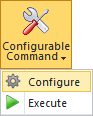
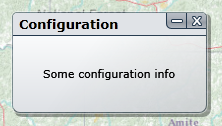
Når du klikker på Konfigurer, aktiveres kommandoens Configure-metode. Med implementeringen som ble vist tidligere, vises følgende dialogboks:

Når ArcGIS Map-webdelen lagres, beholdes teksten i tekstboksen som en streng. Når ArcGIS Map-webdelen lastes inn, sendes denne strengen til LoadConfiguration-metoden og brukes til å initialisere strengvariabelen for konfigurasjon. Når du utfører kommandoen – ved å klikke på kommandoens knapp – vises en meldingsboks med den lagrede konfigurasjonsstrengen.