Running Python 3 code in the interactive console
- Open a console view: Window > Console.
- Use the New Console drop-down and choose Python Console.
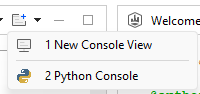
- Select "Python console" in the next dialog box.
- Enter your Python 3 code...

Running Python 3 code from the Python Editor
- Create a new project.
- Open the project properties: Right-click on the project and choose "Properties" (or use Alt+Enter)
- Select section Python and switch the project type to Python:

- Create a new Python script in the scripts folder
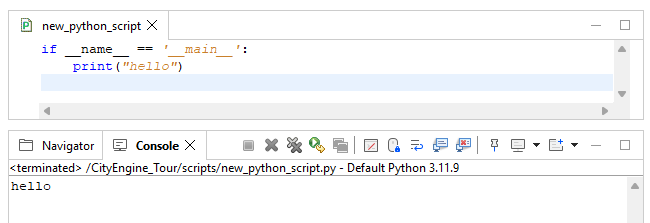
- Focus the Python Editor and hit F9. The script will be run with the configured project Python interpreter.
- Any print output or error messages will appear in a correspondingly named output console:
Managing Python environments
Python 3 environments can be managed in the Python Preferences at Edit > Preferences > Python > Environments:

It is recommended to use separate virtual environments for larger Python scripts and minimize sharing the environments across projects. This allows independent management of 3rd party packages without affecting other projects.
Managing custom virtual environments
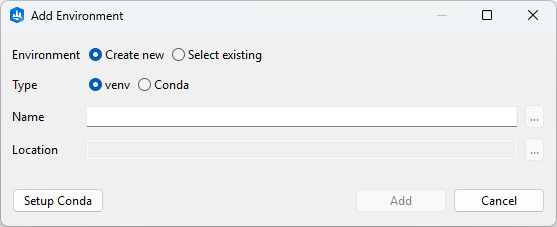
Press the + button in the header of the environment list. This opens a dialog to either add a new or an existing virtual environment. Conda and venv are supported.
Note:
To enable Conda support press Setup Conda and specify the path to the Conda executable. This is only necessary once.
Environments created outside of CityEngine will not have the cityengine package. To install the package in such an environment, select it in the environment list and press the Install CityEngine package button.
Sharing projects with custom Python environments
The configuration of the assigned Python environment is stored per project in the pyproject.toml file located in the project root folder. It is rewritten whenever the project's Python environment changes (for example, when packages are added or removed, or a different environment is selected).
Exporting a project includes this environment configuration. Upon import, a new Python environment is automatically created and the specified packages are installed (requires online access). Projects that do not use Python, or that use an unmodified built-in environment, are assigned the built-in environment of the importing CityEngine.
See also